Ernst & Young
2025
Ernst & Young - Helix
With a user-centered approach, the goal was to recreate Audit Intelligence into a more intuitive and scalable experience for auditors by simplifying complex workflows, improving data visualization clarity, and building a consistent design foundation for future analyzers.
Overview
Making audit data easier to understand
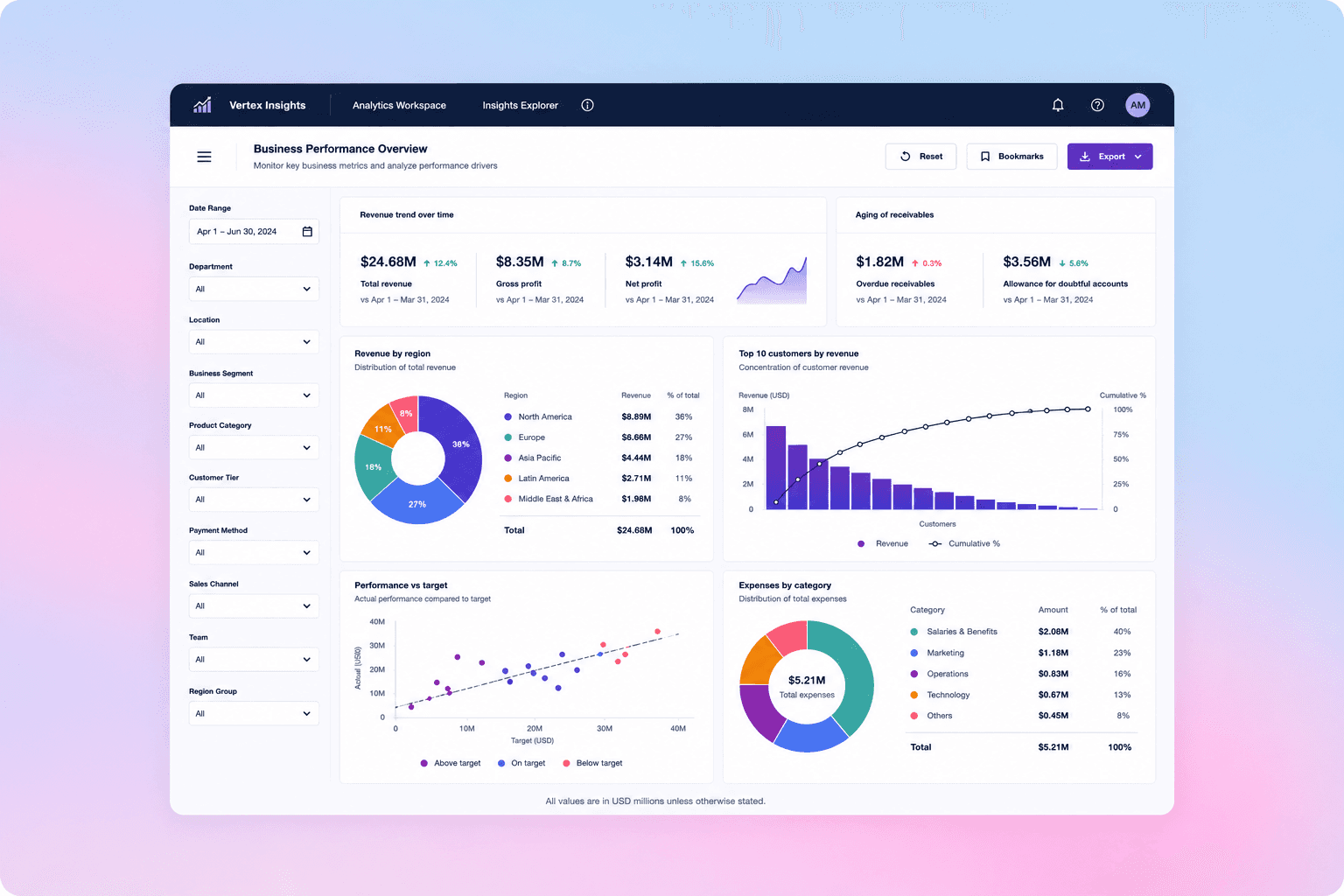
EY Helix is a suite of audit analytics tools built on Power BI, designed to help auditors analyze complex financial datasets across multiple analyzers and workflows. The platform supports audit teams in identifying risks, anomalies, and financial insights through large-scale data analysis.
The goal of the redesign was to create a more intuitive, scalable, and efficient enterprise experience that simplified audit workflows while improving usability, clarity, and consistency across the platform.
Problem
Analyzing complex financial data felt more difficult than it should be
Fragmented Audit Journeys Users were required to navigate across disconnected analyzers and multiple screens to complete a single audit workflow.
Information Overload Dense dashboards and large financial datasets made it difficult to identify critical insights quickly.
The existing experience created cognitive overload through dense dashboards, fragmented workflows, and inconsistent interaction patterns across analyzers. Auditors frequently switched between multiple screens to complete tasks, making insight discovery slower and less intuitive. As the platform expanded, the lack of a unified UX framework also created scalability and consistency challenges across the ecosystem.

01 - Inaccurate chart representation, 02 - Non-scalable matrix, 03 - Cognitive overload of data
Research
Looking beyond the data
Quantitative user research
To establish a baseline understanding of the current experience, quantitative surveys were conducted with auditors using the EY Helix platform. Using Maze, we gathered measurable feedback on usability, workflow efficiency, navigation, and overall satisfaction across multiple analyzers.
What we learned
30% of auditors identified data integration and reporting workflows as their biggest challenge.
Navigation received consistently lower satisfaction scores, indicating difficulty locating key information.
Cross-analyzer workflows required more interactions than users expected, impacting task efficiency.
Dense dashboards contributed to lower usability ratings during complex audit tasks.
The survey results highlighted clear opportunities to simplify navigation, improve workflow efficiency, and create a more consistent experience across the platform.

Qualitative user research
To better understand the survey findings, I conducted one-on-one interviews and collaborative workshops with auditors using FigJam and Miro. These sessions focused on observing real-world audit workflows, understanding decision-making processes, and uncovering the reasons behind the usability challenges identified in the quantitative research.
What we learned
Auditors frequently relied on experience and memory rather than the interface to complete recurring tasks.
Participants often developed personal workarounds to compensate for disconnected workflows across analyzers.
Users found it difficult to determine which information required immediate attention due to the lack of a clear visual hierarchy.
User needs
Simpler, more guided audit workflows.
Greater flexibility to personalize dashboards based on audit context.
Better prioritization of critical insights and anomalies.
"The dashboards contain everything I need, but it's difficult to identify what's actually important."

Interview participant
Auditor
UX strategy
Developed a UX strategy aligned with user needs, business goals, and platform scalability
Through research, workflow analysis, and iterative design, I transformed complex audit workflows into clearer, task-driven experiences. The focus wasn't simply to redesign dashboards—it was to reduce cognitive effort. By restructuring information architecture, simplifying navigation, creating intelligent data visualizations, and establishing a scalable Power BI design system, I helped auditors find critical insights faster.
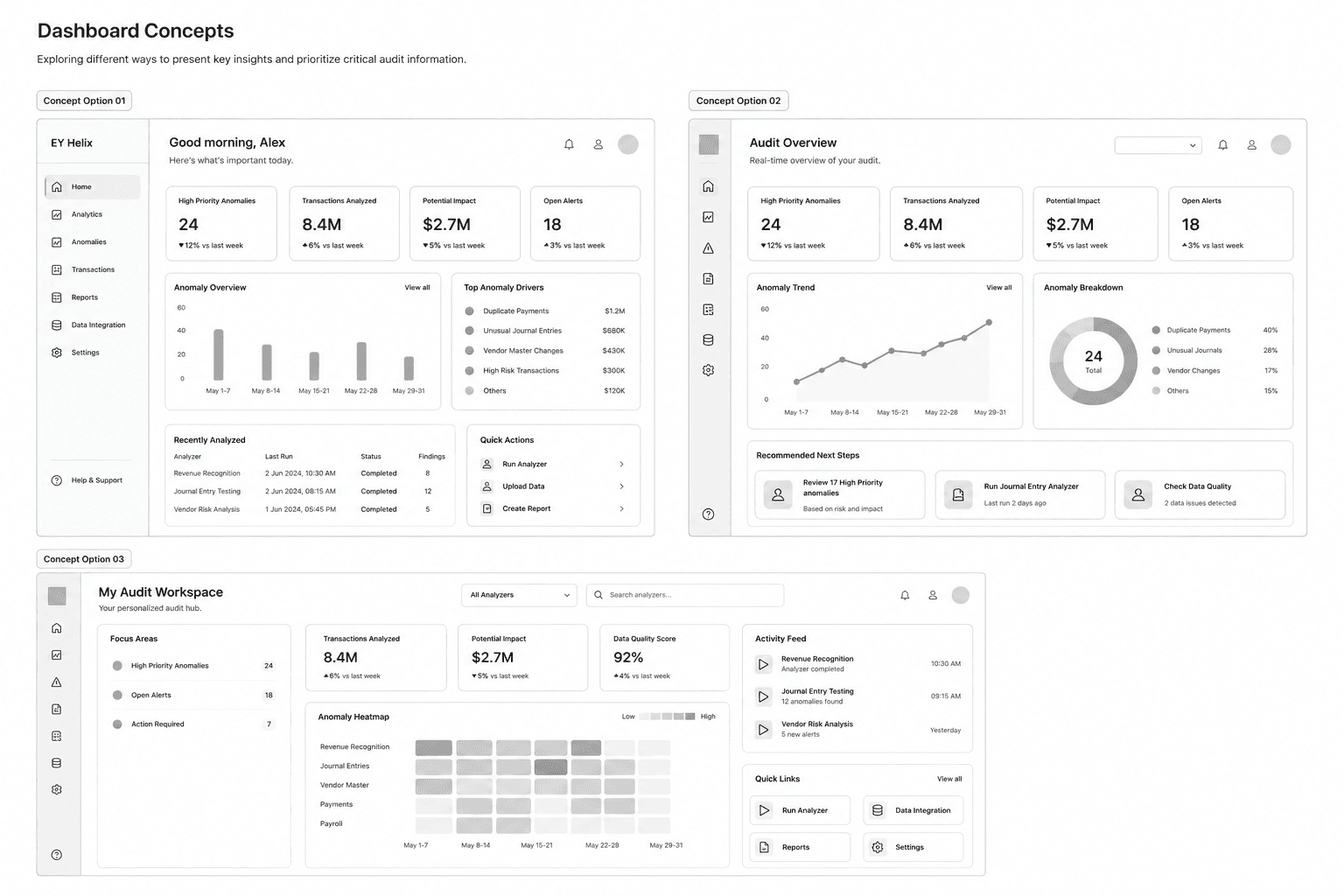
Exploring different dashboard concepts focused on hierarchy, transaction visibility, and clearer everyday audit workflows.
Testing interaction flows early
Before moving into high-fidelity designs, I tested early interaction flows using low-fidelity paper prototypes. These quick sessions helped validate navigation patterns, layout hierarchy, and task completion behavior before investing time into polished UI design.
Designs
Refining the dashboard experience
The final redesign focused on improving clarity across everyday financial tasks through stronger hierarchy, simplified navigation, and more contextual transaction feedback. The updated interface made balances easier to compare, actions easier to locate, and activity flows easier to understand at a glance.

Feedback
Hypothesis-Driven Usability Testing
Validated design hypotheses through moderated usability sessions, measuring task success, navigation efficiency, and cognitive load. Insights from each testing round informed iterative refinements to workflows, information architecture, and interaction patterns before development handoff.
Hypothesis 1
If we simplify dashboard navigation, auditors will locate critical insights faster.
Measure
Task completion time
Success rate
Number of clicks
User confidence
Hypothesis 2
If KPI cards are prioritized using visual hierarchy, users will identify anomalies without scanning the entire dashboard.
Measure
Time to first insight
Eye-tracking (if available)
Think-aloud observations
Hypothesis 3
If related workflows are grouped together, users will switch between fewer screens.
Measure
Number of page transitions
Task completion rate
User satisfaction